
Troubleshooting
Common issues and how to resolve them
title: Troubleshooting description: Common issues and how to resolve them category: troubleshooting order: 1
Running into issues? Find your problem below and click to jump to the solution.
- 1. How to choose the right account with multiple users?
- 2. Environment check failed
- 3. macOS: Failed to get data key (task_for_pid failed)
- 4. Windows: Unable to check for updates
1. How to choose the right account with multiple users?
In the "Select User" step, if the dropdown shows multiple wxid entries, it means multiple accounts have been logged in on this device:
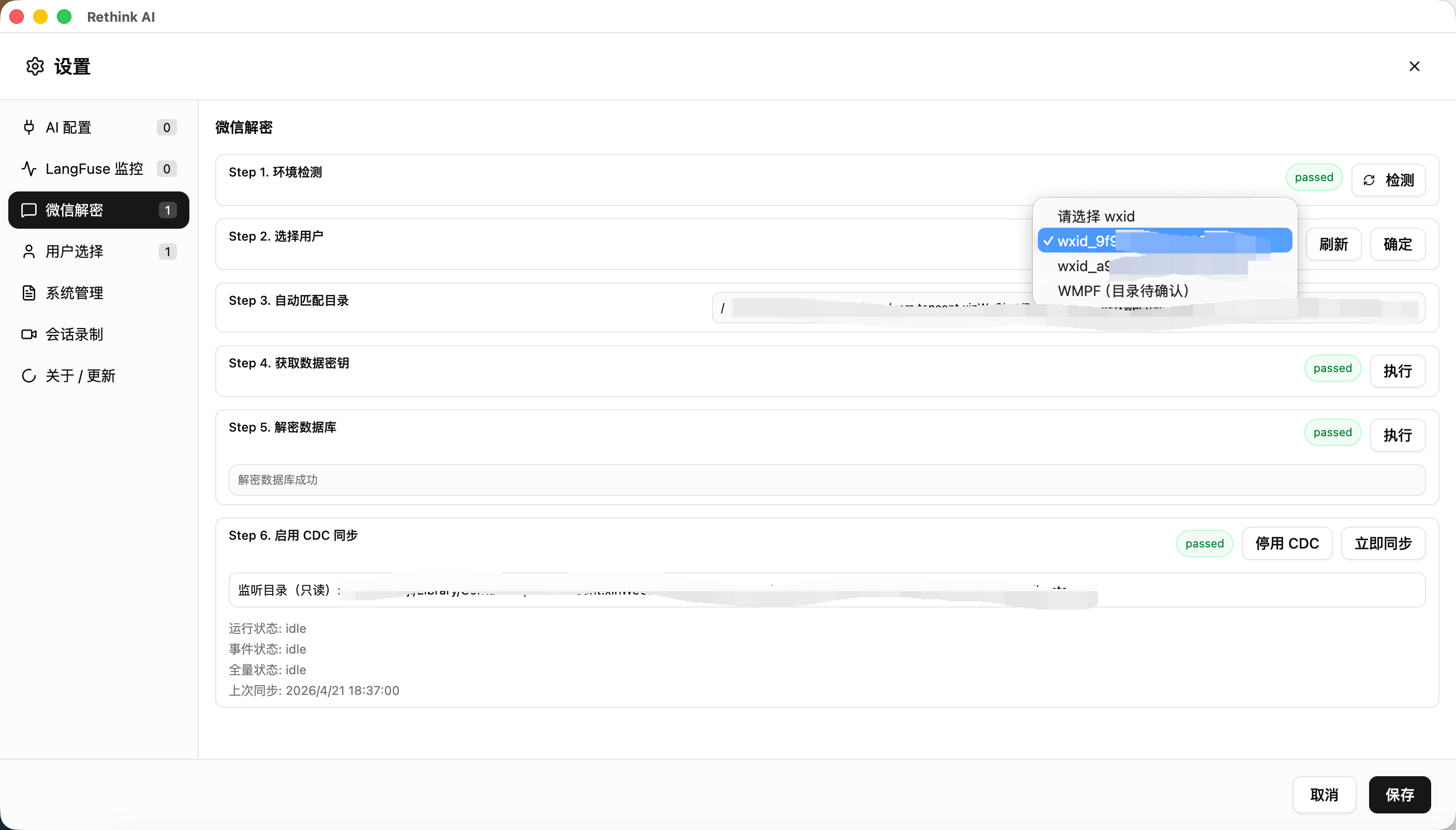
How to identify the correct account
- Select any user and click "Confirm"
- The system will auto-match the data directory (Step 3)
- Open that directory and check the folder contents to verify it belongs to the account you want to decrypt
- If it's not the target account, go back to Step 2, select a different user, and repeat
Folders usually contain chat database files. You can use folder size or modification time to help identify the right one — the most recently active account typically has a larger folder with a more recent modification date.
2. Environment check failed
If Step 1 does not pass:
- Make sure the IM client is installed and running
- Make sure you are logged in to the IM client
- Try restarting the IM client and running the check again
3. macOS: Failed to get data key (task_for_pid failed)
If you encounter the following error on macOS when retrieving the key:
Error invoking remote method 'localDecrypt:getDataKey':
LocalDecryptCommandError: 0:211: execution error: task_for_pid failed: 5
Make sure: (1) running as root, (2) WeChat is ad-hoc signed (1)
[ERROR] find_all_keys_macos failed with code=1
[HINT] macOS key scan needs permission to read WeChat memory.
This happens because macOS security mechanisms prevent the app from reading process memory. There are two solutions:
Option 1: Re-sign WeChat (Recommended)
Open Terminal and run:
sudo codesign --force --deep --sign - /Applications/WeChat.app
Enter your system password, wait for it to complete, then restart and retry decryption.
Option 2: Disable System Integrity Protection (SIP)
SIP is a macOS security feature that restricts process memory access. Disabling it will remove this limitation.
For detailed instructions, see: macOS Enable or Disable SIP — sspai.com
Note: Disabling SIP reduces system security. Try Option 1 first. If you do disable SIP, re-enable it after completing the decryption setup.
4. Windows: Unable to check for updates
The Windows version does not currently support in-app automatic updates. This is because the digital signing certificate for the Windows installer is still being applied for — unsigned installers cannot pass the system's auto-update verification.
We are actively working on obtaining the certificate. Stay tuned.
In the meantime, to update to the latest version, please visit the Download page to manually download and install the latest installer.
If none of the above resolves your issue, please search for QQ group 740412645 and join to leave feedback.